Mini
USD 0.49
💬 Chat60 🧾 Receipt scans8 🎙️ Voice notes2 📤 Data exports1
 catetin.ai AI-Powered Financial Tracking
Record income and expenses faster with AI through chat, receipt scans, and voice notes. Available in 37 countries with 35 group currencies.
Watch how our AI processes text and images together
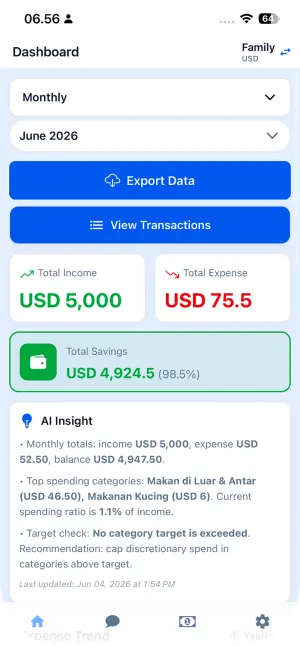
Dashboard
Expense · June 2026
USD 75.50
2% of income · limit 80%
Income
USD 5,000.00
Total Savings
USD 4,924.50 (98.5%)
AI Insight
• Monthly totals: income USD 5,000.00, expense USD 75.50, balance USD 4,947.50.
• Top spending categories are dining and groceries. Current spending ratio is 98.5% of income.
• Target check: No category target is exceeded. Recommendation: cap discretionary spend in categories above target.
Expense Trend
YearlyManage your daily finances in just a few simple steps.
Manage your finances more easily with smart features designed for your daily needs.
Chat
I just bought lunch for USD 20.50
Transaction recorded. ID: 26 | lunch | USD 20.50 | Jun 2
View this week's transactions
Here are your transactions for this week: • ID: 26 | Jun 2 | lunch | USD 20.50
Log and check spending from your home screen, menu bar, watch, Siri, or other apps.
See today's, this week's, this month's or this year's spending, income, and balance for your groups, with progress against income and each group's limit. On iPhone, pick a group and period per widget and tap ▶ to switch groups; on Android, scroll through all of them. Amounts are hidden when biometric login is on.
Read the guideSay "Log an expense in catetin.ai" and the AI records it in Chat. You can also scan a receipt or open your dashboard from Siri, Shortcuts, and Spotlight. Phrases are in English.
Read the guideThe system document scanner finds the receipt's edges and flattens the photo, then AI fills in the form. Used in Scan Receipt, transaction attachments, and the chat camera.
Share a receipt image or a voice/audio file from another app, pick a group, then scan it or add it to chat.
The desktop app shows your spending in the macOS menu bar or the Windows and Linux tray. Its menu lists your groups and switches between daily, weekly, monthly and yearly.
Read the guideSee each group's spending at a glance and log an expense by voice from your wrist, then confirm the AI's answer right on the watch. Add complications, the Smart Stack widget, or a Tile.
Read the guideVoice notes, receipt scans, and data exports are available on Free, Premium, and Pro. Upgrade to get higher quotas on each feature.
Record expenses by speaking on any plan. Your monthly voice note quota grows from Free to Premium to Pro.
Scan receipts on every plan. Higher tiers unlock more scans per month for heavier usage.
Export transaction data from any plan. Monthly export quotas increase as you move from Free to Premium to Pro.
Choose the plan that fits your needs
Localized Pricing
Your app language picks an initial currency automatically. Switch currencies to preview localized prices for each supported market.
Prices come from the App Store and Google Play for this country and update daily. Your store may add local taxes.
Free plan to get started
Premium plan for bigger needs
Professional plan for teams
All prices below are shown in USD for United States.
| Duration | Free | Premium | Pro |
|---|---|---|---|
| 1 month | USD 0 | USD 1.49 | USD 2.49 |
| 3 months | USD 0 | USD 3.99 | USD 5.99 |
| 6 months | USD 0 | USD 6.99 | USD 8.99 |
| 1 year | USD 0 | USD 9.99 | USD 14.99 |
All transactions are encrypted and secure
Cancel or upgrade anytime
Support team ready to assist you
💡 Important about Chat AI Quota:
* Auto AI Insights are only generated while Chat AI quota is available. If it runs out, AI Insights resume when more quota becomes available, for example through subscription renewal, a top-up, or a plan upgrade.
✅ Manual tracking (add/edit/delete transactions) is always unlimited and free forever, regardless of Chat AI quota.
🔄 Remaining subscription quota carries into the next billing period when the subscription renews, and the new period's allowance is added.
Subscription quota is used first. Purchased top-ups stack, never expire—even after the subscription ends—and are shared across all groups you own.
Buy permanent quota packs without changing your subscription. Exact prices and currencies are shown in the app by RevenueCat for your App Store or Google Play storefront.
USD 0.49
USD 0.99
USD 1.99
AI-Powered Financial Insights
Rp 0
+10% You spent 10% more than last week
Total savings
Rp 0
2 of 10 goals complete
Customize categories and budgets to match your lifestyle.
Record manually or upload receipt photos.
View summaries, export reports, and share them to your chosen platform.
Answers to common questions about using catetin.ai.
No. You can record manually anytime.
Yes! You can export reports and share financial summaries to platforms supported by your device.
Absolutely. We use industry-standard encryption to protect your data. Your financial information is stored securely and never shared with third parties.
Yes, catetin.ai offers a free plan with essential features. Premium and Pro include localized prices across supported countries.
Premium costs USD 1.49 per month or USD 9.99 per year, and Pro costs USD 2.49 per month or USD 14.99 per year. 3- and 6-month plans are also available. The pricing page and your App Store or Google Play show the price for your country. One-time quota top-ups start at USD 0.49.
You can update your billing information in the Settings menu under "Account" section. Changes will be reflected in your next billing cycle.
Open the app and tap Scan Receipt (or attach a receipt to a transaction, or use the camera in Chat). The system document scanner (VisionKit on iPhone, ML Kit on Android) finds the receipt's edges and flattens the photo, then AI fills in the amount, category, and date on the form for you to check. Each scan uses 1 chat and 1 photo quota.
Yes! The Group Notes feature lets you manage finances together with family or a group. All members can log expenses into one shared, organized record.
Yes! Data export is available on every plan, with monthly quotas increasing from Free to Premium to Pro. CSV files open directly in Excel, Google Sheets, or any spreadsheet app.
Quota top-ups are one-time purchases that stack and never expire. They are shared across every group you own. Before you buy, the native catetin.ai app shows the exact price and currency from your App Store or Google Play storefront.
On iPhone, touch and hold an empty area of the home screen, tap Edit > Add Widget (or the + button), search for catetin.ai, choose Spending, and pick the small or medium size. On Android, touch and hold the home screen, open Widgets, and drag catetin.ai's Spending widget to the home screen. It shows the spending for today, this week, this month or this year, progress against income and the group's limit (red once the limit is reached), plus income and balance, and it updates when anyone in the group adds a transaction. On iPhone, a widget follows the group and period selected in the app; touch and hold it and tap Edit Widget > Group or Period to pick others (Daily, Weekly, Monthly or Yearly), or stack several widgets to swipe between groups and periods; with iOS 17 or later, you can also tap the ▶ button next to the group name to switch to the next group. On Android, the widget lists all your groups in a scrollable list for the period last picked on the dashboard. The medium iOS widget has a Log expense button that opens Chat and a Scan Receipt button that opens the receipt scanner; the Android widget is view-only. If biometric login is on, amounts are hidden.
Yes, on iPhone, with English phrases. Say "Log an expense in catetin.ai" and Siri asks "What did you spend?"; Chat then opens and the AI records your expense. "Scan a receipt in catetin.ai" opens the receipt scanner, and "Show my spending in catetin.ai" opens the dashboard. All three actions are also in the Shortcuts app and Spotlight. This isn't available on Android.
Yes. The Apple Watch app (watchOS 10 or later) comes with the iPhone app, and the Wear OS app (Wear OS 4 or later) is on Google Play. Both show each group's spending for today, this week, this month or this year, with a period button, and add watch-face complications: a Smart Stack widget on Apple Watch and a Tile on Wear OS. Sign in on your phone and open the app once; the watch then gets your groups.
Yes. Tap Log expense on the watch and speak or type, for example "coffee 25k" (dictation, Scribble or the keyboard on Apple Watch). The watch sends it to the group's Chat, shows the AI's answer, and offers suggested replies such as "Yes, create" to confirm. It uses 1 chat quota, and after the first sign-in on the phone the watch can log on its own over Wi-Fi or LTE.